






What is the Facebook Ads Library?
The Facebook Ads Library is Meta's free search engine for ads. It shows every ad running right now on Facebook, Instagram, Messenger, Threads and Audience Network. Meta renamed it the Meta Ad Library, but it's the same tool at facebook.com/ads/library.
Meta built it so anyone can see who is advertising and what they say. You don't need a Facebook account or an ad account to use it.
Next to the ads running today, it keeps three kinds of older ads:
- Ads about social issues, elections or politics from the past seven years
- Ads that ran anywhere in the EU in the past year
- Ads that ran in the UK in the past year, from 1 July 2025 on
Any other ad drops out of the library once the advertiser stops it. A new ad shows up within 24 hours of its first view. For a dropshipper, that makes the library a live feed of what other stores are paying to promote this week.
How to search the Facebook Ads Library
- 1
Open the library
Go to facebook.com/ads/library, or use the search box at the top of this page, which opens it with your search filled in.
- 2
Pick a country
Choose the country you sell to, or All. Results are ads that reached people there.
- 3
Choose All ads
The ad category menu has two options. All ads is the one you want. The other, Issues, elections or politics, shows political ads only.
- 4
Type a keyword or a brand
A keyword matches words in the ad text. As you type, Meta suggests Facebook pages. Pick one to see only that page’s ads.
- 5
Read the results
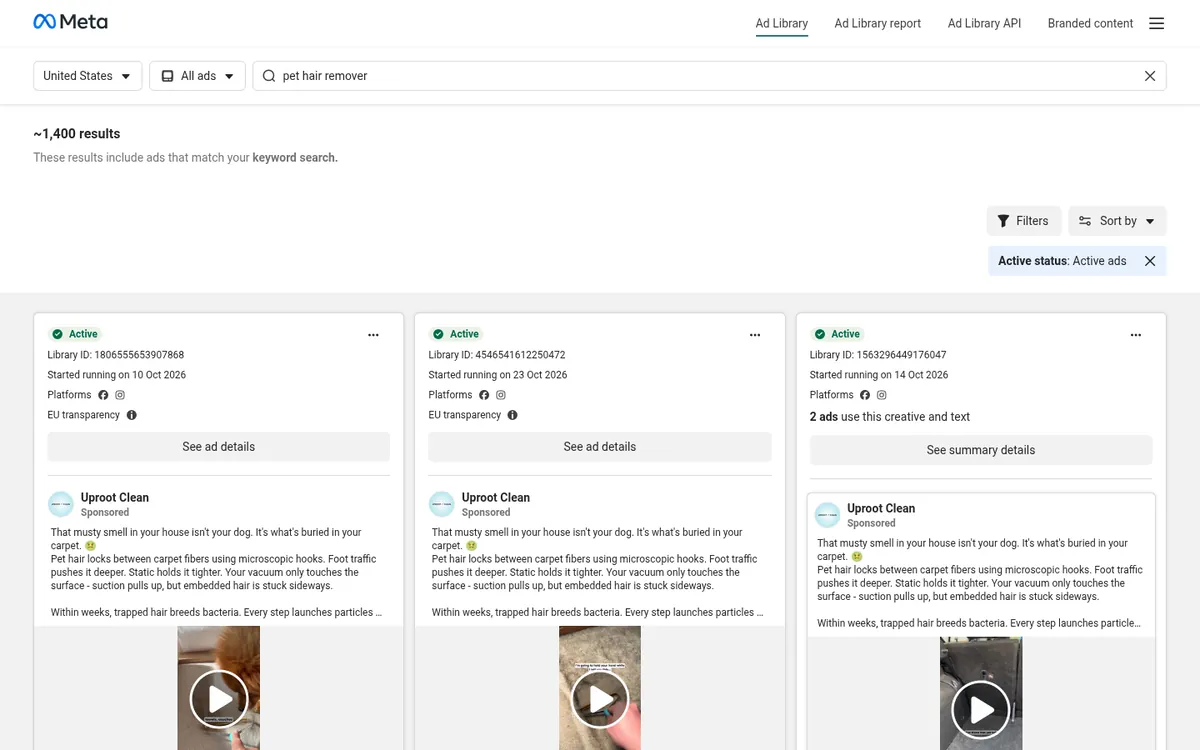
Every card shows whether the ad is active, the date it started running, the platforms it runs on, and the ad itself with its text, picture or video and link.
Search tips that save time
- Use the words in the ad, not the product code. Ads say “posture corrector”, not “orthopedic brace”. Try the product name, the problem it fixes (“back pain”) and words ads love (“finally”, “viral”).
- Put a phrase in quotes to match those exact words in that order.
- Keep Active status on Active ads. Stopped ads tell you what failed, not what sells.
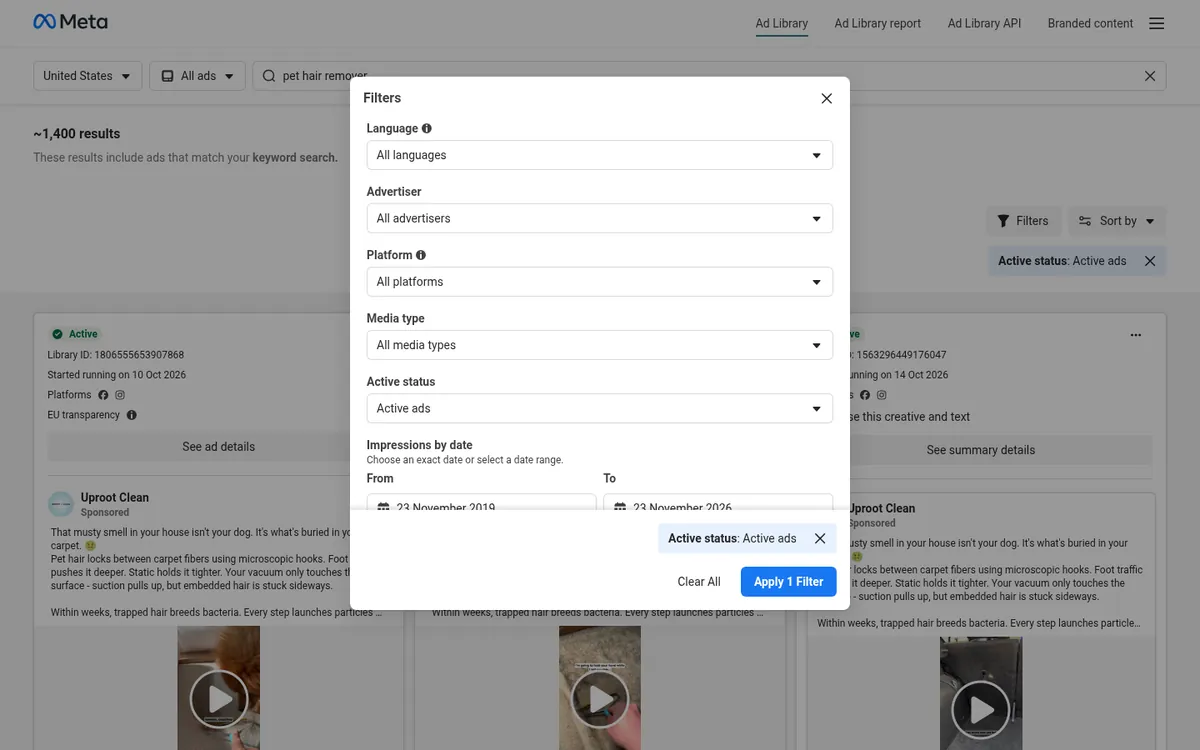
- Open Filters to narrow by language, advertiser, platform, media type (image, video and more) and the dates the ad was shown.
- Change Sort by between Impressions: high to low and Most recent. Impressions puts the most-seen ads first, but never shows the number.
- Look for “2 ads use this creative and text”. It means the shop copied the ad into more ad sets, which shops do when an ad works.
What the library shows, and what it hides
For every ad you see:
- Whether it is active, and the date it started running
- The platforms it runs on
- The full ad: text, picture or video, headline, button and link
- The Facebook page that runs it
- How many ads use the same picture and text
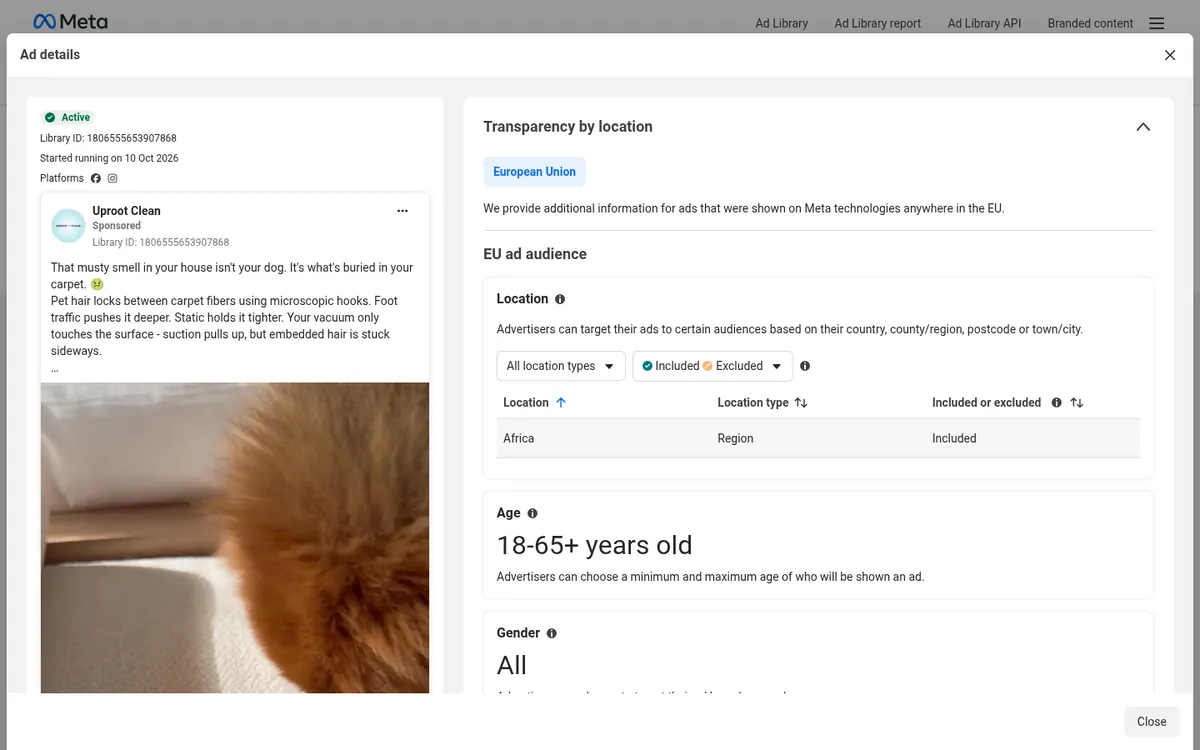
For ads shown in the EU, Transparency by location adds who the ad was aimed at (places, age and gender) and how many accounts in the EU saw it, split by country, age and gender.
What you never see:
- Spend and sales. Meta shows spend for political ads only. For a product ad there is no budget, no clicks and no orders.
- Stopped ads from most countries. Outside the EU and UK, an ad disappears once it stops, so last year’s winners are gone.
- The store’s numbers. You see the Facebook page, not the shop’s revenue, traffic or best sellers.
- The product’s cost. You see the ad, not where the product comes from or what it earns per sale.
- A download button for pictures or videos.
How to spot a winning ad
With no spend or sales, you read the signals Meta does show.
- 1
Days running
Shops switch off ads that lose money, often within days. An ad that has run for a month is likely paying for itself. Three months or more is a proven ad.
- 2
Many copies
“5 ads use this creative and text” means the shop pushed the ad into more ad sets to reach more people. Shops copy what works.
- 3
New versions of the same product
A shop that keeps making fresh videos for one product is still selling it. One old ad can be a forgotten ad; five new ones never are.
- 4
Several shops, one product
When three different stores advertise the same product, people are buying it. It also means you will have competition.
- 5
A real store behind it
Click the link. A product page with reviews, a clear price and a strong offer tells you the shop is serious.
How to see a competitor’s Facebook ads
- 1
Find their page
Type the brand’s name and pick their Facebook page from the suggestions. Or open their Facebook page, find Page transparency and choose Go to Ad Library.
- 2
Sort by Most recent
The newest ads come first, so you see what they launched this week: new products, new hooks and new offers.
- 3
Then look at the oldest ads
The ads with the earliest start dates are the ones still paying for themselves. Those show you their best product and their best angle.
- 4
Check back every week
Meta doesn't tell you when a page launches a new ad. In ProductLair you can track the shop and get its new ads in your feed and your Monday email.
How dropshippers use it to find products
A simple workflow that turns the library into product ideas:
- 1
Search problems, not products
Search words from your niche like “dog shedding”, “back pain” or “messy car”, in the country you sell to, with active ads only.
- 2
Keep ads older than 30 days
Skip anything that started this week, because you can’t tell yet if it works. Save the rest with their start dates.
- 3
Open the store
Check the product page, the price, the reviews and the offer. Write down the price.
- 4
Check the numbers
Find the product at a supplier and work out what is left after product cost, shipping and ads. If the price isn't about three times the cost, there's little room for ads. Our free profit calculator does the math.
- 5
Make your own angle
Don’t copy the ad. Note the hook, the first three seconds, the offer and the comments, then make your own version for a new audience or with a better offer.
ProductLair does steps 1 to 4 for you
Facebook and Instagram ads from Shopify stores, sorted by days running, with the shop's revenue and the product's margin one click away.
Browse ads that already sellCommon mistakes
- Copying an ad that started last week. New ads are tests, and most tests get switched off.
- Searching only big brand names. You find brands with budgets a new store can't match. Search problems and product words instead.
- Forgetting the country. An ad that runs in the US may never run in Germany. Search the market you sell to.
- Copying the video word for word. It belongs to someone else, it can be reported and taken down, and it looks like a copy to the people who saw the original.
- Stopping at the ad. The ad is half the story. The price, product page and offer are the other half.
Meta’s Ad Library compared with ProductLair
Meta's library is the place to check one brand or one keyword. ProductLair is built for finding products: it starts from the ads that keep running and the stores behind them. See how it works in the Meta ad spy tool, or try the TikTok Ad Library and the Shop Library.
| Feature | Meta Ad Library | ProductLair |
|---|---|---|
| Price | Free | 6 ads free, every ad from $39/month |
| Search by keyword or advertiser | Yes | Yes |
| Sort by days running | No, only by impressions or newest | Yes, plus a Top ads ranking |
| Only ads from online stores | No, every advertiser | Yes, Shopify stores |
| The shop behind the ad | Facebook page name | Revenue, traffic and live ads |
| The product and its margin | No | Yes, for products we track |
| Image and video downloads | No download button | Yes, on Launch and up |
| Alerts for new ads | No | Yes, for shops you track |
| Ad spend | Political ads only | Not shown |
