


How to Start Dropshipping in 2026 (Data Guide)
How to start dropshipping in 2026 with 5,943-product data, cost ranges, product filters, supplier checks, and a beginner launch plan.

Learn how to dropship on Shopify: set up your store, validate products with 5,943-product data, choose a Shopify dropship app, price correctly, and test traffic.
 By Anders Myrmel
Summarize with:
To dropship on Shopify, create a Shopify store, choose a product you do not hold in inventory, connect a supplier or fulfillment app, list the product on your store, and have the supplier ship each order directly to the customer. The hard part is not opening the store. The hard part is picking a product with enough demand, margin, supplier reliability, and proof to survive paid traffic.
That is where most beginner Shopify dropshipping advice is too thin. It jumps from "install a Shopify dropship app" to "run ads" without showing the product validation, pricing, and trust math in between. This guide keeps the app comparison in its place. For the full tools comparison, use our best Shopify dropshipping apps and software guide. If you are still choosing the business model, budget, and first product, start with the broader how to start dropshipping guide. This article is the Shopify operating workflow.
The cleanest beginner workflow is:
Shopify's own dropshipping guide explains the basic model: a supplier handles packing and shipping after your store gets the order. Shopify's help center also defines dropshipping as selling products that come from suppliers who ship on your behalf, usually through dropshipping apps.
The useful question is not "Can I dropship with Shopify?" You can. The useful question is "Which product deserves a Shopify store, and what has to be true before I spend money on traffic?"
A product that sells on Amazon is not automatically a good Shopify dropship product. Amazon has built-in trust, buyer intent, reviews, fast shipping expectations, and price comparison on the same page. A Shopify store starts with none of that.
For a beginner, a Shopify-compatible product usually has five traits:
ProductLair's inventory scan of 5,943 dropshipping products found a median product price of $17.99. That does not mean every beginner should sell a $17.99 product. Our price-tier analysis found that the $30-50 product tier had the highest best-seller rate at 16.4%, while products above $100 had the lowest best-seller rate at 8.1%. If you are using paid traffic, the middle range usually gives you more room to pay for a click and still keep profit.
For product ideas that fit a Shopify store specifically, use our best dropshipping products for Shopify post. For a broader research workflow, start with ProductLair's product research system, browse the product library, or use the winning product finder.
Here are examples from ProductLair's curated product database where the product cost, selling price, and margin leave room for Shopify testing. Use the Product Library or Product Research to inspect current product records before choosing a test.
| Product | Research Context | Total Cost | Example Sell Price | Gross Profit | Gross Margin |
|---|---|---|---|---|---|
| EMS Muscle Stimulator | Curated margin example | $0.88 | $44.40 | $43.52 | 98.0% |
| Rolling Knife Sharpener | Curated margin example | $5.95 | $79.90 | $73.95 | 92.6% |
| Posture Corrector | Curated margin example | $2.98 | $47.99 | $45.01 | 93.8% |
| No Pull Dog Harness | Curated margin example | $6.95 | $39.99 | $33.04 | 82.6% |
| Electric Car Aroma Diffuser | Curated margin example | $12.00 | $35.29 | $23.29 | 66.0% |
These are not guarantees. They are examples of why product economics matter before store design. A product with weak gross profit forces every later step to be perfect.
Before you install the best dropshipping app for Shopify or pay for Shopify dropshipping software, validate the product itself. Beginners often reverse the order. They buy an app, import 40 products, then wonder why none convert.
Use this validation checklist:
| Validation Question | What to Check | ProductLair Shortcut |
|---|---|---|
| Is there demand? | Reviews, sales volume, search interest, social proof, competitor stores | Product library and product pages |
| Is the margin real? | Product cost, shipping, platform fees, payment fees, returns, ad costs | Profit calculator |
| Can you source it? | Supplier availability, stock stability, shipping countries, tracking quality | Supplier comparison |
| Can you market it? | Clear demo, problem, before-and-after, niche audience, SEO angle | Winning product finder |
| Is it safe to sell? | Product safety, claims, recalls, restricted categories, trademarks | Shopify's dropshipping compliance guidance |
The margin test is simple:
Expected profit per order = selling price minus product cost minus shipping minus platform fees minus payment fees minus return allowance minus ad cost.
If the product only makes sense before ads, it does not make sense for paid traffic. If it only makes sense with a perfect supplier, perfect conversion rate, and no refunds, it is too fragile for a beginner.
For deeper math, use our guides on how to price dropshipping products, how much it costs to start dropshipping, and how to test dropshipping products without wasting money.
ProductLair is not a fulfillment app. It helps you decide what is worth selling before you connect DSers, AutoDS, Spocket, CJ Dropshipping, or another fulfillment tool. That distinction matters because a fulfillment app can make order processing easier, but it cannot rescue a weak product.
Here is the stack split:
| Tool Type | Job in Shopify Dropshipping | Examples | What It Does Not Do |
|---|---|---|---|
| Product research layer | Finds and validates products before import | ProductLair, ad spy tools, research databases | Does not fulfill customer orders |
| Supplier marketplace | Gives you products and suppliers to source from | AliExpress, CJ Dropshipping, Spocket suppliers | Does not always validate demand or margin |
| Fulfillment app | Imports products, syncs stock, pushes orders, updates tracking | DSers, AutoDS, Spocket, CJ Dropshipping | Does not prove the product is worth selling |
If you want the detailed app-by-app comparison for "best Shopify dropshipping software" or "best dropshipping app for Shopify," use the dedicated Shopify dropshipping software comparison. For this workflow, pick the fulfillment option based on supplier fit:
Also read our full guide to finding dropshipping suppliers and our shipping breakdown on dropshipping shipping times before promising delivery dates on the product page.
Do not spend a week decorating the store before the product is proven. Set up enough infrastructure to take real orders, collect payment, communicate delivery expectations, and look legitimate.
For a lean Shopify dropshipping store, finish these basics before traffic:
| Setup Area | What to Configure | Why It Matters |
|---|---|---|
| Plan and domain | Start with the lowest Shopify plan that supports the launch, then connect a real domain | Shopify's US pricing page lists Basic at $39/month when paid monthly and $29/month when paid yearly as of May 2026, so keep the first store lean |
| Theme | Use a fast free theme before buying a premium theme | The product, offer, proof, and shipping promise matter more than decorative design |
| Payments | Enable Shopify Payments, PayPal, or another supported provider for your country | Checkout friction and payment trust affect conversion from the first order |
| Shipping zones | Match shipping rates, countries, and processing times to the supplier you actually chose | A supplier that ships in 8-15 business days should not be paired with a 3-5 day promise |
| Policies | Add refund, privacy, terms, shipping, and contact pages | Buyers need to understand delivery, returns, and support before paying |
| Essential apps | Install only the fulfillment app, review app, email app, or tracking app you genuinely need | App overload slows the store and creates monthly costs before you have product proof |
Shopify's pricing page and billing overview are the source of truth for current plan costs, because offers and country pricing change. After the basics are live, place a test order or run through checkout in test mode before sending paid traffic.
Include the customer tracking page in that review. Our dropshipping order-tracking checklist shows how to connect each item to its package and distinguish label creation from carrier acceptance.
For the refund page specifically, use our dropshipping return policy template so your Shopify policy matches supplier return terms, shipping delays, and refund-without-return decisions.
Before publishing colors, sizes, or packs, use our dropshipping product variant checklist to connect each customer choice to its current supplier item. Our catalog audit found 1,770 stored option labels, but those labels alone do not establish fulfillment mappings.
After you pick a supplier or app, you can import the product into Shopify. The import is only the starting point. Supplier descriptions are usually written for marketplaces, not for a branded Shopify store.
Before choosing a theme, study real examples. Our dropshipping store examples analysis shows the stores worth copying tend to win through product economics, search intent, direct traffic, and proof rather than decoration.
Rewrite the page around the buyer's problem:
For copy structure, use our guide to dropshipping product descriptions. For trust-building, use the dropshipping social proof guide. Shopify's App Store can help with reviews, email, and upsells, but keep your first store lean. App overload is a common beginner mistake.
Do not price by multiplying supplier cost by 2 and hoping the margin works. A Shopify dropship product needs to survive the full cost stack.
| Cost Item | Typical Beginner Range | Notes |
|---|---|---|
| Shopify plan | Around $39/month after trial pricing | Check Shopify's pricing and billing overview for your country and billing cycle |
| Domain | $10-20/year | Usually bought through Shopify or a registrar |
| Theme | $0-400 one-time | Start with a free theme unless the product needs a premium layout |
| Product research | $0-49+ | ProductLair starts as a one-time research layer, not a monthly fulfillment app |
| Fulfillment app | Free to $40+/month to start | DSers has a free plan, while AutoDS and Spocket commonly start as paid plans |
| Samples | $30-100 per product test | Order samples before scaling traffic |
| Review, email, or upsell apps | $0-50/month | Use free tiers first |
| Payment processing | Percentage plus fixed fee per order | Rates vary by Shopify plan, payment provider, and country |
| Returns and reships | 5-10% revenue reserve | Higher for fashion, electronics, fragile products, and vague sizing |
| First traffic test | $100-500 per product | Depends on channel, price point, and conversion rate |
Our startup cost guide goes deeper, but the important point is simple: your product price has to pay for more than the item. It has to pay for customer acquisition, trust building, support, refunds, and the time it takes to find a winner.
Use the profit calculator before launching. For payment risk, read dropshipping payment processing. For the common pricing mistakes, read how to price dropshipping products.
Shopify dropshipping stores fail when they look anonymous. The product may be real, but the store feels disposable.
Minimum trust signals:
Shopify gives you the store infrastructure. You still have to reduce the customer's risk. That is why supplier uncertainty and shipping promises matter. If your fulfillment app says 8-15 business days, do not advertise 3-5 day delivery.
For more on this layer, read dropshipping social proof, dropshipping shipping times, and dropshipping payment processing.
Once the product page is live, test one channel at a time. Beginners usually spread too thin: three products, five ad sets, two organic channels, and no clear decision rule. That creates noise, not learning.
Pick a traffic path based on the product:
| Traffic Channel | Best Fit | Watch First |
|---|---|---|
| TikTok organic | Visual demos, impulse products, low-cost items | Hook rate, saves, comments, profile clicks |
| TikTok or Meta ads | Products with clear video proof and margin above $25 per sale | CPM, click-through rate, cost per add to cart, purchase CPA |
| Google Ads | Problem-solving products with search intent | Search term quality, conversion rate, return on ad spend |
| SEO | Evergreen products, niche stores, guides, comparison content | Impressions, clicks, product page assisted sales |
| Organic content | Products with repeated questions or clear education angle | Content velocity, email signups, direct product clicks |
For paid channels, start with a controlled budget and a decision rule. For example: if a $200 test produces strong clicks but no add-to-cart events, fix the product page. If it produces add-to-cart events but no purchases, fix price, shipping, trust, or checkout. If it produces purchases but loses money, adjust price, bundle, offer, or audience before scaling.
Read our full guide on testing dropshipping products without wasting money. For channel selection, compare Google Ads vs Facebook Ads, dropshipping SEO, and the best marketing channels for dropshipping products.
After the first test, do not judge the product by vibes. Use a simple decision table:
| Result | What It Usually Means | Next Move |
|---|---|---|
| No clicks | Creative, hook, audience, or product angle is weak | Rewrite the angle or test a different creative |
| Clicks but no add to carts | Product page, offer, price, or trust issue | Improve the page before more traffic |
| Add to carts but no purchases | Shipping, payment, pricing, checkout, or surprise fee issue | Fix checkout friction and trust |
| Purchases but negative profit | CPA too high or margin too low | Raise price, bundle, improve AOV, or cut ads |
| Profitable purchases | Product has a signal | Increase budget slowly and add proof |
Scaling does not mean doubling the ad budget every day. It means confirming that the product can hold conversion rates as traffic broadens. Pausing is not failure if the numbers are weak. Switching products after a controlled test is cheaper than forcing a bad product for a month.
The biggest dropshipping mistakes usually come from skipping this discipline: selling saturated products, underpricing, ignoring shipping, trusting supplier claims blindly, and scaling before the economics are proven.
For most beginners, the stack should be boring:
| Need | Lean Choice | Why |
|---|---|---|
| Store platform | Shopify Basic | Enough to launch a real store |
| Product research | ProductLair plus free validation tools | Validate what to sell before importing products |
| Supplier or fulfillment | DSers, AutoDS, Spocket, or CJ Dropshipping | Pick based on supplier location, shipping, and automation needs |
| Margin math | Profit calculator | Keeps ads and fees from hiding losses |
| Supplier comparison | Supplier comparison | Avoids picking only by product cost |
| Product ideas | Best Shopify dropshipping products | Keeps product-list intent separate from this tutorial |
| App comparison | Best Shopify dropshipping apps | Keeps software comparison intent separate from this tutorial |
This stack is intentionally not an all-in-one answer. Shopify dropshipping has separate jobs: research, sourcing, fulfillment, store building, trust, traffic, and analytics. If you force one tool to do everything, you usually overpay or make weaker product decisions.
Start by choosing one product, validating demand and profit margin, connecting a supplier or fulfillment app, setting up the Shopify store basics, building a focused product page, and testing one traffic channel with a controlled budget. Do not start by importing dozens of random products. Product choice, pricing, trust, and traffic discipline matter more than catalog size.
It depends on the job. DSers is a common low-cost AliExpress fulfillment app. AutoDS is broader automation software. Spocket focuses on US and EU supplier access. CJ Dropshipping can handle sourcing and fulfillment. ProductLair is not a fulfillment app, it is the product research and validation layer before you choose one of those tools.
A lean beginner setup can start around the cost of Shopify, a domain, a free or low-cost fulfillment app, samples, and a small traffic test. A more realistic first-month budget is often $500-1,500 once you include product samples, apps, creative, and ads. See our full dropshipping startup cost breakdown for the detailed model.
Yes. That is the point of dropshipping: you sell the product first, then the supplier ships it to the customer. You still need to own the customer experience. That means clear shipping estimates, refund handling, product quality checks, payment processing, and support.
ProductLair is dropshipping product research software, not fulfillment software. Use ProductLair to find and validate products with profit data, supplier cost context, competitor notes, TikTok and ad context, and launch plans. Then use DSers, AutoDS, Spocket, CJ Dropshipping, or another fulfillment app to process orders.
Avoid counterfeit products, trademarked products, products with risky health claims, fragile items with high breakage risk, unclear sizing, very long shipping windows, and products with too little gross profit to cover ads and returns. Our guide to biggest dropshipping mistakes covers the common traps.
With paid traffic, a store can get a first sale within days if the product, page, price, and targeting are strong. With SEO or organic content, expect a longer timeline because you are building traffic instead of buying it. The better question is how quickly you can gather a clean product signal without overspending.
Use software for repetitive tasks like importing products, syncing inventory, sending orders to suppliers, and updating tracking. Do the strategic work manually at first: product selection, margin validation, offer writing, trust-building, and test analysis. Automation is useful after the product is worth automating.
Learning how to dropship on Shopify is mostly learning how to make disciplined product decisions. Shopify gives you the store infrastructure. DSers, AutoDS, Spocket, and CJ Dropshipping can help with importing and fulfillment. ProductLair helps with the decision before that: what to sell, why it might work, what the margin looks like, and what risks to check before spending money.
Start with one product, one supplier path, one product page, and one traffic test. Use the data from each step to decide whether to improve, scale, pause, or switch products. That is slower than the hype version of Shopify dropshipping, but it is the version that gives beginners a real chance to learn without burning through ad budget blindly.
How to start dropshipping in 2026 with 5,943-product data, cost ranges, product filters, supplier checks, and a beginner launch plan.

We filtered 5,943 products for the 15 best Shopify store picks. $15-60 sweet spot, proven demand, and real margin data.
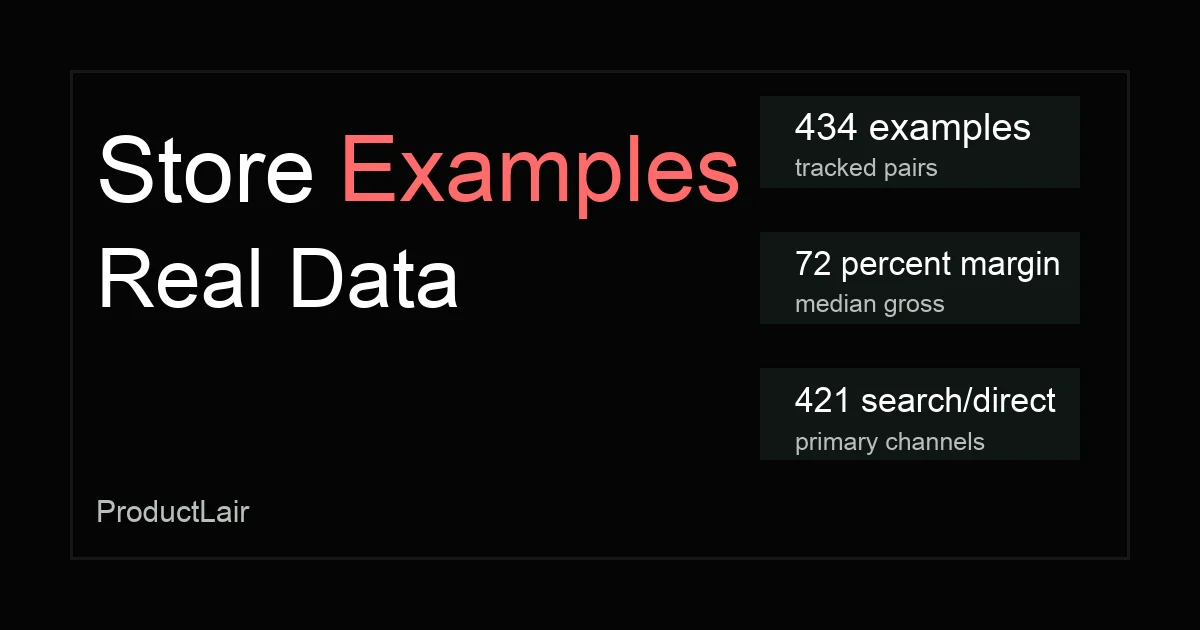
We analyzed 434 dropshipping store examples to compare real margins, traffic channels, product fit, and what successful Shopify stores do differently.